
seo title: how to spot a phishing email in seconds: simple tips to stay safe
focus keyword: how to spot a phishing email
meta description: learn how to spot a phishing email in seconds using simple checks for suspicious senders, links, urgent messages, attachments, and requests for personal information.
image suggestions:
- a person examining a suspicious email on a laptop
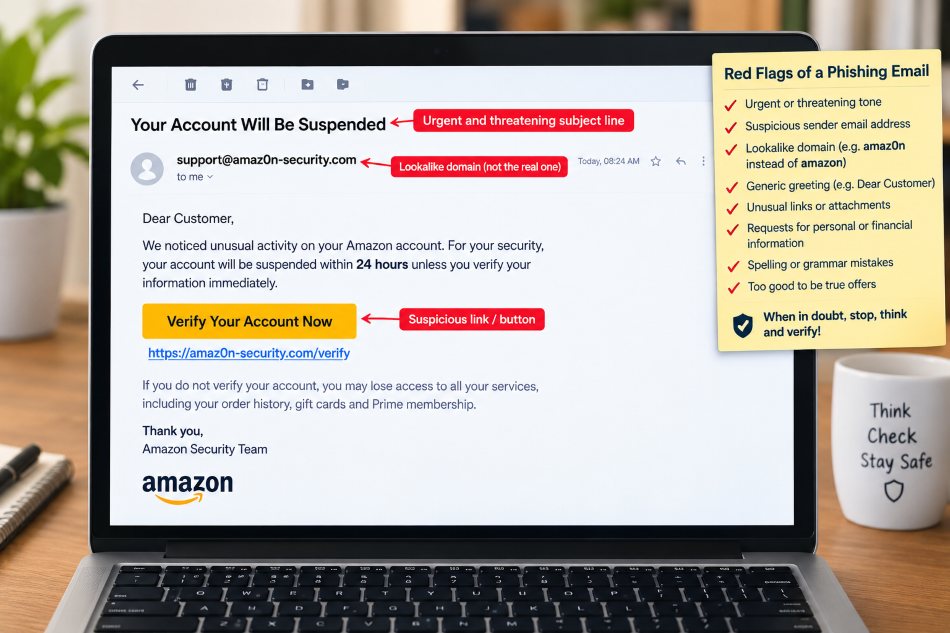
- a close-up of an email showing a suspicious sender address and link
- an illustration showing the five warning signs of a phishing email
- a cybersecurity shield protecting an email inbox
- a simple infographic titled “spot a phishing email in 10 seconds”
how to spot a phishing email in seconds
phishing emails are designed to look genuine. they may appear to come from your bank, amazon, paypal, microsoft, a delivery company, your workplace, or even someone you know.
the goal is usually simple: make you click a malicious link, open an attachment, reveal a password, provide financial information, or send money.
the good news is that you do not need to be a cybersecurity expert to identify many phishing emails. with a few quick checks, you can often recognize the warning signs within seconds.
what is a phishing email?
a phishing email is a fraudulent message designed to trick you into revealing sensitive information or taking an unsafe action.
a scammer may pretend to be a trusted company and claim that:
• your account has been locked
• there is a problem with your payment
• you have an unpaid bill
• your package could not be delivered
• your password needs to be changed
• you have received a refund
• you have won a prize
• suspicious activity has been detected
• an urgent document needs your signature
the ftc warns that phishing messages commonly try to persuade people to click links, open attachments, or provide personal and financial information.
the 10-second phishing test
when an unexpected email arrives, don’t immediately click anything.
instead, use this quick test.
1. check the sender
look carefully at the complete email address, not just the name displayed in your inbox.
a message may show:
“amazon customer service”
but the actual address could be something completely unrelated.
for example:
legitimate-looking name: amazon support
suspicious address: support-amazon-help@example.com
a strange domain, misspelling, extra words, or unusual characters should make you cautious.
2. look for urgency
phishing emails often try to make you panic.
watch for phrases such as:
“act immediately”
“your account will be closed today”
“payment failed”
“final warning”
“verify within 24 hours”
“your account has been compromised”
the purpose is to stop you from thinking carefully.
the ftc specifically recommends slowing down when a message creates pressure to act quickly.
3. don’t trust the logo
a professional-looking logo does not prove that an email is genuine.
scammers can copy company logos, colors, fonts and layouts.
a fake email can therefore look almost identical to a genuine message.
always examine the sender address and the requested action instead of trusting the appearance.
4. inspect the link before clicking
never click a suspicious link simply because it says “verify account” or “view invoice.”
on a computer, move your mouse over the link without clicking it.
look at the destination address.
be suspicious of:
• unfamiliar domains
• shortened urls
• misspelled company names
• strange combinations of letters and numbers
• domains that have nothing to do with the supposed sender
cisa recommends being particularly cautious with untrusted shortened urls and links that do not match the supposed sender.
5. ask yourself: was i expecting this?
this is one of the fastest checks.
if you receive an invoice from a company you never used, a delivery notification for something you didn’t order, or an account warning for a service you don’t have, stop.
an unexpected message deserves extra scrutiny.
6. watch for requests for passwords or financial information
be extremely cautious when an unexpected email asks for:
• passwords
• banking details
• credit card information
• one-time passwords
• security codes
• identity information
• cryptocurrency payments
• gift cards
never provide sensitive information merely because an email asks for it.
7. check the greeting and writing
some phishing messages contain:
“dear customer”
“dear user”
“dear valued member”
instead of your actual name.
grammar and spelling mistakes can also be warning signs, although modern phishing emails can be professionally written.
therefore, good grammar does not automatically mean an email is safe.
8. be careful with attachments
an unexpected attachment can contain malicious software.
be particularly cautious with unfamiliar:
• zip files
• executable files
• office documents
• html files
• pdf files
• password-protected archives
if you were not expecting the attachment, verify it independently before opening it.
9. don’t use the contact details inside a suspicious email
suppose an email claims to be from your bank and gives you a telephone number.
don’t automatically call that number.
instead, find the bank’s official website or use the telephone number printed on your bank card.
the ftc recommends contacting an organization through contact information you know to be genuine rather than information supplied in the suspicious message.
10. when in doubt, do nothing
this may be the most important rule.
you don’t have to respond immediately.
don’t click.
don’t reply.
don’t download.
don’t call the number in the message.
don’t provide information.
take a moment and verify the request independently.
a simple “stop, check, verify” method
remember these three words:
stop
don’t react emotionally.
check
look at the sender, link, attachment and request.
verify
contact the supposed company or person using an independent, trusted method.
this simple habit can prevent many phishing attacks.
common phishing email examples
fake bank alert
“we detected unusual activity on your account. click here immediately to secure your account.”
warning signs:
• unexpected security warning
• urgent language
• link requesting login information
fake amazon or shopping notification
“your recent order could not be delivered. update your payment information now.”
warning signs:
• unexpected order
• payment request
• suspicious link
fake microsoft or google security alert
“your password has expired. click here to keep your account active.”
warning signs:
• pressure to click
• login request
• unfamiliar website
fake delivery message
“your package is waiting. pay a small delivery fee to receive it.”
warning signs:
• unexpected delivery
• payment request
• suspicious link
fake boss or colleague
“i need you to purchase gift cards urgently. send me the codes when completed.”
warning signs:
• unusual request
• urgency
• financial transaction
what if the email looks completely genuine?
this is where people can make mistakes.
modern phishing attacks can be highly convincing. a message may contain the correct logo, professional language and familiar branding.
so don’t rely on appearance alone.
if the email asks you to log in, go directly to the company’s official website by typing the address yourself or using a trusted bookmark.
don’t use the link provided in the email.
the ftc recommends this approach because phishing links may lead to fake websites designed to steal login information.
what should you do with a phishing email?
if you believe an email is phishing:
- don’t click any links.
- don’t open suspicious attachments.
- don’t reply.
- don’t provide personal information.
- report the message as spam or phishing.
- delete it after reporting.
- if necessary, contact the organization being impersonated.
cisa recommends reporting suspicious messages and deleting them rather than interacting with links or attachments.
what if you already clicked?
don’t panic.
your next steps depend on what happened.
if you entered a password, change it immediately from the legitimate website. if you used the same password elsewhere, change it there too.
if you provided financial information, contact your bank or card provider immediately.
if you downloaded something suspicious, update your security software and run a security scan.
the ftc recommends changing compromised passwords and taking appropriate security steps after a phishing incident.
how to protect yourself before phishing happens
good security habits provide protection beyond simply recognizing suspicious emails.
use strong, unique passwords
don’t use the same password for your email, banking, shopping and social media accounts.
a password manager can help create and store unique passwords.
turn on two-factor authentication
two-factor authentication adds another verification step when you sign in.
even if a criminal obtains your password, an additional authentication factor can make account takeover more difficult.
keep software updated
keep your operating system, browser, applications and security software updated.
updates often include important security fixes.
back up important data
regular backups can reduce the damage caused by malware or ransomware.
keep important files backed up using a reliable backup method.
use spam and phishing filters
modern email services automatically filter many suspicious messages.
however, don’t assume that every message reaching your inbox is safe.
some phishing messages can still get through.
useful affiliate product ideas for smart.thevohras.com
the following categories can fit naturally into an article about phishing protection.
amazon.com affiliate ideas
• password managers
• hardware security keys
• antivirus and internet security software
• secure backup drives
• privacy-focused routers
• webcam privacy covers
• security-focused computer accessories
clickbank affiliate ideas
look for reputable products in categories such as:
• cybersecurity education
• online privacy
• identity protection
• password security
• scam-awareness training
• internet security courses
always review the product, refund policy, reputation and claims before recommending it.
digistore24 affiliate ideas
potential categories include:
• cybersecurity courses
• online privacy training
• identity protection tools
• password-management solutions
• internet safety guides
• digital security training
because affiliate marketplaces frequently change their available products and offers, check the current marketplace before publishing a specific product name.
quick phishing checklist
before clicking an unexpected email, ask:
✓ do i know the sender?
✓ is the sender’s real email address correct?
✓ was i expecting this message?
✓ is the message creating unnecessary urgency?
✓ is it asking for personal or financial information?
✓ does the link lead to the correct website?
✓ is there an unexpected attachment?
✓ can i verify the request independently?
if something feels wrong, stop.
frequently asked questions
can a phishing email look exactly like a real email?
yes. scammers can copy logos, colors, layouts and other branding. appearance alone should never be considered proof that an email is genuine.
can opening an email infect my computer?
simply viewing a message is generally less risky than clicking links or opening attachments, but malicious content can exploit vulnerabilities. keeping your email software, browser and operating system updated reduces risk.
should i click “unsubscribe” on a suspicious email?
not necessarily. if the message itself looks suspicious, don’t interact with it. report it as spam or phishing and delete it. cisa specifically advises against clicking even an “unsubscribe” link in a suspicious message.
is a misspelled word proof that an email is phishing?
no. spelling mistakes are a warning sign, but sophisticated phishing emails may have excellent grammar.
can scammers fake a familiar sender name?
yes. the displayed name can be misleading. always check the actual email address.
should i reply to ask whether the email is genuine?
it’s safer not to reply to a suspicious email. independently contact the person or organization using a trusted phone number, website or separate communication channel.
can antivirus software stop phishing?
security software can provide useful protection against malware and some malicious websites, but it cannot replace careful judgment. never assume that security software makes every email safe.
does two-factor authentication prevent phishing?
two-factor authentication provides valuable additional protection, but it does not make phishing harmless. attackers may use sophisticated techniques to steal credentials or authentication information. remain cautious even when 2fa is enabled.
final thoughts
phishing works because scammers exploit human emotions such as fear, curiosity, urgency and trust.
the best defense is to slow down.
when an unexpected email asks you to click, pay, download, verify or provide information, stop for a few seconds.
check the sender.
inspect the link.
question the request.
verify it independently.
those few seconds can protect your money, identity, accounts and personal information.
learning how to spot a phishing email is not about becoming a cybersecurity expert. it is about developing one simple habit:
when an email makes you want to act immediately, stop and check first.
affiliate disclosure
this article may contain recommendations for products or services that may be available through affiliate programs such as amazon.com, clickbank and digistore24. if you purchase through an eligible affiliate link, we may receive a commission at no additional cost to you. we only recommend products or services that we believe may be useful to our readers. availability, pricing, features and affiliate relationships may change, so please verify current information before purchasing.